icon: gem
功能介绍
Stallee:您的数字作品售卖平台
Stallee 是一个灵活的数字物品售卖平台,让您轻松出售各种类型的数字作品。以下是我们的主要功能:
- 多样化的商品类型:用户付款后即可查看或下载您的数字作品。
- 版本管理:每件商品可设置多个版本,支持单独定价,并允许用户通过补差价进行升级。
- 优惠券支持:精准设置优惠券的使用范围,提升销售灵活性。
- 无限文件上传:无限空间,文件大小不受限制,还可通过 Dropbox 同步到 Stallee。
- 无限下载流量:上传的文件可以被无限次下载,确保用户随时获取。
- 自定义店铺配色:打造独一无二的店铺风格,与众不同。
- 黑名单功能:可禁止某些恶意用户或盗版贩售者,保护您的作品。
- 自定义服务条款:买家在购买前需先同意您的服务条款,确保透明交易。
加入 Stallee,轻松开启您的数字作品销售之旅!
icon: circle-dollar
Currencies
You can set a currency for your products, but when users pay, we will convert it to USD at the daily exchange rate, and settlements are also in USD.
Currently supported currencies
- USD - US Dollar
- GBP - British Pound
- EUR - Euro
- JPY - Japanese Yen
- INR - Indian Rupee
- AUD - Australian Dollar
- CAD - Canadian Dollar
- HKD - Hong Kong Dollar
- SGD - Singapore Dollar
- TWD - New Taiwan Dollar
- NZD - New Zealand Dollar
- BRL - Brazilian Real
- ZAR - South African Rand
- CHF - Swiss Franc
- ILS - Israeli New Shekel
- PHP - Philippine Peso
- KRW - South Korean Won
- PLN - Polish Zloty
- CZK - Czech Koruna
icon: hand-holding-circle-dollar
Fees
Transaction Fee Description
When a transaction occurs, part of the order amount is deducted as a handling fee, and the remainder is added to your balance.
Platform Fee
When selling on Stallee, we charge a small fee called the Platform Fee:
- We charge 6% + $0.50 per transaction
Payment Processing Fee
Payments for Stallee are provided by Stripe and PayPal, each of which charges a certain fee:
- Stripe 3.9% + $0.30
- PayPal 4.4% + $0.30
Settlement Fee
We settle payments through PayPal, and each transaction is charged a 1% fee.
icon: envelope
Contact Us
If you have any questions, feel free to contact us.
icon: rectangle-history-circle-plus
Create Your First Product
Click “Add Product,” select your product type, and enter the product name and price.
 (1).png)
Add a product description and upload a cover image.
 (1) (1) (1) (1).png)
Add paid content that users can access after they make a payment.
 (1) (1) (1) (1).png)
The product is currently in draft status. Click the three dots in the top-right to publish it.
icon: folder-check
Classic Products
This is a general type of digital product sale. After payment, users can view the paid content of the product. It remains valid indefinitely, and users will also see updated content when it changes.
 (1) (1) (1).png)
After the buyer pays, they can view the paid content you have set.
 (1) (1).png)
icon: rectangle-code
Redemption Code Products
Each redemption code is unique, one per line. After payment, users will randomly receive a redemption code until sold out.
 (1) (1).png)
icon: thumbs-up
Subscription Products
Subscription products help sellers earn ongoing revenue. If your work needs regular delivery, consider this type of product. After a user pays, they can view all paid content. Once the subscription expires, the user can no longer access that content.
In addition, subscription products support automatic billing with credit cards and PayPal, ensuring stable income for sellers.
 (1) (1) (1).png)
You can set different billing periods.
 (1) (1) (1).png)
Set different paid content for each tier. You can add multiple paid sections with different titles for easier organization.
 (1) (1).png)
icon: cubes
Bundled Products
Stallee supports bundling multiple classic products for sale, limited to items without multiple versions. After payment, users will obtain viewing access to all included products, making it easy to get everything you need.
 (1).png)
icon: hand-holding-circle-dollar
Coupon Feature
We offer two types of coupons: percentage-based and fixed-amount coupons. You can choose according to your needs.
 (1) (1).png)
icon: layer-group
Multi-version Products
Classic products allow you to set multiple versions, each with its own paid content. Users can choose the version they want based on their needs.
In addition, you can decide whether to allow users to upgrade to a higher-priced version by paying the difference, or set a prerequisite version that forces users to purchase one version before accessing others.
You can also set each version to be purchased independently, requiring users to buy each version separately.
.png)
icon: marker
Order Marking Feature
This feature is intended for sellers to mark orders. For example, when providing services outside the platform, sellers can easily mark related orders.
There are two places where you can mark an order
1 Order details, at the bottom under fulfillment
.png)
2 Order list, you need to enable fulfillment in the columns first
 (1).png)
Then you can directly manage orders in the order list
 (1).png)
icon: chart-pie-simple-circle-dollar
Refund Policy
Due to the special nature of digital goods, refunds are not supported in most cases. However, you can contact us to request a refund in the following situations:
- You accidentally purchased the same product again, or already obtained it elsewhere.
- The product has no actual content.
- The product content is inaccessible (e.g., invalid cloud storage link; please try contacting the seller first).
- The seller committed fraudulent behavior.
- The pre-sale product has not released any actual content.
- When upgrading with a price difference, you accidentally paid the full amount (you should have clicked “purchase with price difference”).
- There is an abnormal purchase caused by issues with the Stallee platform.
- Other reasonable refund requests.
Refund Handling Fee
Refunds themselves do not incur a fee, but payment channels do not return their transaction fees, so any necessary deductions should be made accordingly:
- If the buyer is at fault (e.g., purchased the wrong item), the buyer covers the fee.
- If the seller is at fault (e.g., the product has no actual content), the seller covers the fee.
- If the platform is at fault, the platform covers the fee.
icon: envelope-open-dollar
Settlement
We use PayPal for payouts, which charge a 1% fee (paid to PayPal).
By default, Stallee sets a 7-day settlement period, meaning any funds in your balance become withdrawable after 7 days. This is because some users may request refunds (for example, purchasing the wrong item or a duplicate, or issues with the product). After the settlement period, you can request a withdrawal at any time (each withdrawal also requires a settlement period). Stallee will process your request within 24 hours.
icon: store
Store Color Scheme
You can customize your store's color scheme in the admin panel, or directly choose from preset color schemes.
.png)
icon: note-sticky
Store Pages
Store pages are located at the top, making it easy for you to add information and notify users. By default, a "Contact Information" page is provided for users to get your contact details; this page cannot be deleted.
.png)
Store Top
.png)
Admin Settings
icon: memo
Terms of Service
You can customize your store's terms of service and enable them in the admin panel. Once enabled, users must agree to the terms before purchasing products. If you update the terms in the admin panel, buyers who previously agreed will need to agree again before making further purchases.
.png)
icon: user-slash
Blacklist
You can blacklist a user, preventing them from accessing your homepage or buying your products. Any existing subscriptions will be automatically canceled.
You can do this in the Customers section of the admin panel.
icon: pen-field
Custom Buyer Information Collection
In the "Other Settings" tab of the product, you can set up custom buyer information collection. Users must fill in this information before they can proceed with the purchase.
.png)
icon: star-shooting
How to View Purchased Products
You can view your purchased products in the following three ways:
1 On the product page under "Paid Content".
.png)
2 In the top-right corner, when you hover over your profile picture, a menu will appear. You can also click here to directly access "My Purchases".
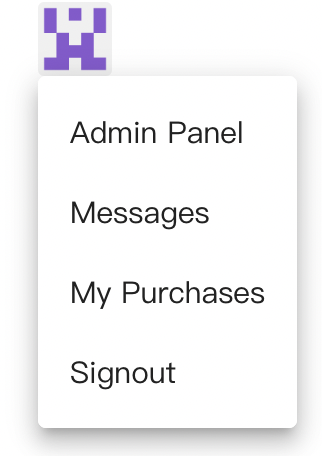
3 If your account has an email address, the system will send you an email containing the purchased products.
icon: empty-set
After logging in, the purchased order is missing
This situation indicates that you logged into the wrong account. If you do not remember the other account, you can contact us and provide the order number from that time so we can help you locate it.
icon: merge
Account Merge
If you inadvertently registered multiple accounts (Stallee directly via Google or Facebook, etc.) and each has purchase records, you can contact us to merge them by sending your account information (such as email, Facebook ID, etc.) to [email protected]. Your login info, order history, and product permissions for viewing/downloading will be merged into a single account.
icon: calendar-days
Manage My Subscriptions
You can view your subscription information in "My Purchases" in the backend. Before the subscription expires, you can pause auto-renew at any time or switch subscription tiers:
- Upgrade: If you upgrade from a lower tier to a higher tier, the system will calculate the price difference based on the remaining days. After payment, the upgrade is complete.
- Downgrade: If you downgrade from a higher tier to a lower tier, the system does not provide refunds and will directly process the downgrade. Once downgraded, it cannot be reverted.
- Change Cycle: For instance, if you switch from monthly billing to annual billing, we will directly update the billing cycle.